
So generieren Sie Shopify-Produktkreationen mit KI: Der komplette Workflow
Shopify-Shops leben und sterben von ihren Produktbildern. Mit der KI-Kreativgenerierung können Shopify-Händler aus einem einzigen Produktfoto Heldenbilder, Kollektionsbanner, Lifestyle-Aufnahmen und soziale Assets erstellen – ohne Fotografen oder Designer.
Clyero Team
Produkt & Wachstum
October 28, 2025
Updated April 4, 2026
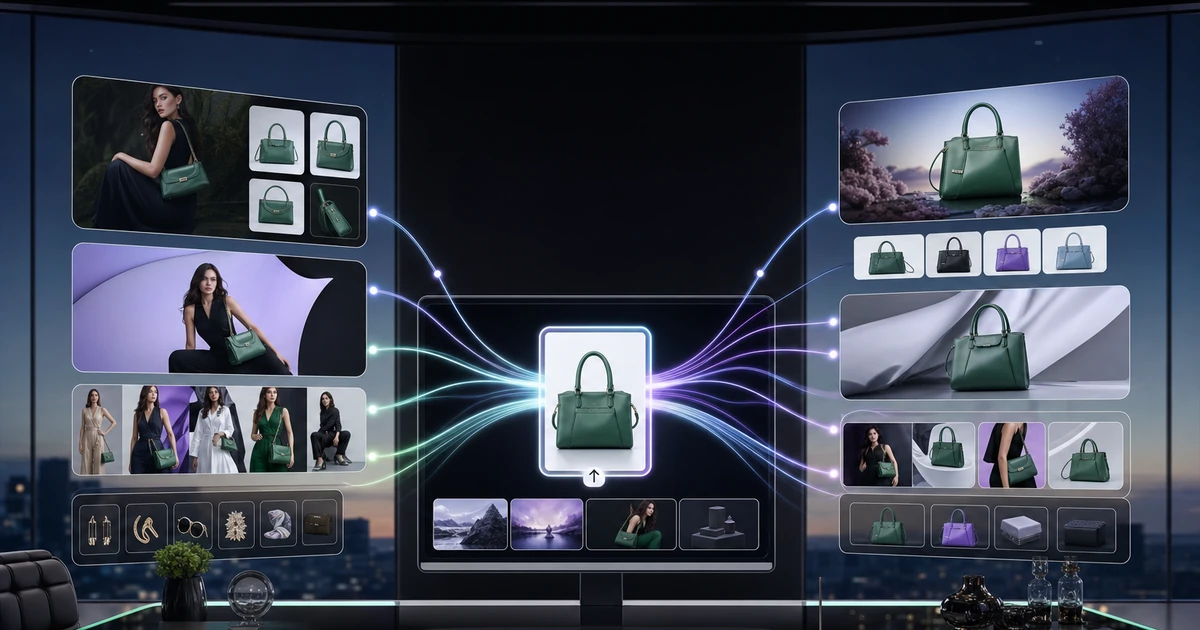
Shopify-Produktbilder sind eine der Variablen mit der höchsten Hebelwirkung bei der E-Commerce-Konvertierung. Studien belegen immer wieder, dass die Qualität des Produktbildes der wichtigste Faktor bei Online-Kaufentscheidungen ist, doch die meisten Shopify-Shops arbeiten mit inkonsistenten, veralteten oder unzureichenden kreativen Ressourcen. Die KI-Generierung verändert die Produktionsökonomie völlig.
So sieht ein komplettes Shopify-Kreativset aus
Eine voll ausgestattete Shopify-Produktseite braucht mehr als ein gutes Foto. Ein komplettes Kreativset für eine einzelne SKU umfasst:
- Hauptproduktbild: Sauberer Hintergrund, passend zu anderen Produkten im Shop
- Zusätzliche Blickwinkel: 3–6 Sekundäransichten, die verschiedene Facetten des Produkts zeigen
- Lifestyle-Bild: Produkt im Einsatz oder in einem relevanten realen Kontext
- Detail-/Texturaufnahme: Nahaufnahme, die die Materialqualität oder ein Hauptmerkmal hervorhebt
- Maßstabsreferenz: Zeigt die Produktgröße im Verhältnis zu einem vertrauten Objekt oder einer vertrauten Umgebung an
- Sammlungsbild: Zugeschnittene/gestylte Version für Sammlungs- und Kategorieseiten
In den meisten Shopify-Shops fehlen für jedes Produkt mindestens drei davon. Mit der KI-Generierung können Sie alle sechs in einem einzigen Pipeline-Lauf produzieren.
Bildspezifikationen für Shopify-Themes
Shopify stellt Bilder in der Auflösung bereit, in der sie hochgeladen werden, bis hin zu 50×50 für Miniaturansichten. Ziele hochladen:
| Bildtyp | Empfohlene Größe | Formatieren |
|---|---|---|
| Produkthauptbild | 2048×2048 px | JPEG oder WebP |
| Sekundäre Produktbilder | 2048×2048 px | JPEG oder WebP |
| Sammlungsfeaturebild | 1600×1600 px | JPEG |
| Helden-/Bannerbild | 1920×600–1080 px | JPEG oder WebP |
| Warenkorb/Miniaturansicht | Automatisch generiert von Shopify | — |
Die meisten KI-Tools generieren standardmäßig mit 1024×1024. Vor dem Hochladen auf Shopify immer auf 2048×2048 hochskalieren.
Der Shopify-Workflow zur Creative-Generierung
Schritt 1: Katalogprüfung
Überprüfen Sie vor der Generierung, was Sie haben. Identifizieren Sie Produkte ohne sekundäre Bilder, inkonsistente Hintergründe, Bilder mit niedriger Auflösung oder fehlende Lifestyle-Aufnahmen. Priorisieren Sie zuerst SKUs mit hohem Traffic und hohem Umsatz.
Schritt 2: Legen Sie Ihren visuellen Standard fest
Definieren Sie, wie „Markentreue“ für Ihr Geschäft aussieht. Dies bedeutet: Hintergrundtyp (Weiß, warmes Grau, Lifestyle), Beleuchtungsstil (sanftes Studio, natürlich, dramatisch) und Rahmen (zentriertes Produkt, 80 % Füllung, 1:1-Zuschnitt). Die Eingabe dieser Parameter in ein Marken-Kit gewährleistet eine konsistente Ausgabe in Ihrem gesamten Katalog.
Schritt 3: Stapelweise nach Produktkategorie generieren
Gruppieren Sie ähnliche Produkte – dasselbe Material, dieselbe Silhouettenkategorie – und lassen Sie sie durch dieselben Pipeline-Einstellungen laufen. Dadurch entsteht automatisch ein zusammenhängender visueller Satz, da die Generierungsparameter innerhalb des Stapels konsistent bleiben.
Schritt 4: Sammlungs- und Banner-Assets generieren
Sobald die Bilder pro Produkt genehmigt wurden, verwenden Sie die Produktbilder, um Assets auf Sammlungsebene und Kampagnenebene zu generieren. Ein Banner auf einer Kollektionsseite mit drei Produkten aus demselben Sortiment sollte so aussehen, als ob sie zusammengehören – die KI-Generierung mit denselben visuellen Parametern gewährleistet dies.
Schritt 5: Massen-Upload auf Shopify
Exportieren Sie den vollständigen Satz mit konsistenter Dateibenennung (product-handle_image-type_variant.jpg) und laden Sie ihn über den CSV-Import von Shopify oder eine Bulk-Upload-App in großen Mengen hoch. Ordnen Sie Bilder den richtigen Produkten und Varianten in der Importdatei zu.
Generieren von Creatives auf Store-Ebene aus Produktbildern
Über einzelne Produktseiten hinaus benötigen Shopify-Shops:
Held-Banner auf der Startseite: Verwenden Sie Ihre besten Produktbilder als Input. Erstellen Sie ein großformatiges Lifestyle-Banner mit einer Auflösung von 1920 x 600–1080, das das Produkt im Kontext mit klarem Negativraum für Textüberlagerungen zeigt.
E-Mail-Header-Grafiken: 600 x 300 Pixel großes Produktbild mit Kampagnenkontext, generiert, um dem saisonalen oder werblichen Ton zu entsprechen.
Social-Media-Thumbnails: 1:1- und 4:5-Ausschnitte der Lifestyle-Bilder, vorgefertigt für Instagram- und Pinterest-Raster.
Ein einziger Clyero-Pipeline-Durchlauf kann all dies aus einer Produktreferenz in den richtigen Abmessungen für jeden Kanal gleichzeitig produzieren.
Hinweise zur Themenkompatibilität
Nicht jedes Shopify-Theme behandelt Bilder auf die gleiche Weise. Die Themen „Dawn“ und „Refresh“ verwenden Produktbilder in voller Breite und profitieren von Lifestyle-Bildern mit negativem Platz auf einer Seite für Text. Minimalistische Themen wie Sense oder Craft zeigen Bilder in engeren Rahmen, bei denen die Klarheit des Produkts wichtiger ist als der Kontext. Passen Sie Ihren Generierungsstil an die Anzeigelogik Ihres Themes an.
Return on Creative Investment
Ein Shopify-Shop, der Produktbilder von Platzhalterfotos auf ein konsistentes, professionelles, KI-generiertes Set aktualisiert, verzeichnet in der Regel innerhalb von 30 Tagen eine messbare Verbesserung der Add-to-Cart-Rate. Die Wirtschaftlichkeit ist einfach: Die KI-Generierung im großen Maßstab kostet einen Bruchteil der herkömmlichen Fotografie und das Ausgabevolumen ist wesentlich höher.
Related Clyero workflows
Continue with practical workflows for product visuals, video, ad creative, and marketplace content.
Frequently Asked Questions
Welche Bildabmessungen empfiehlt Shopify für Produktfotos?
Können KI-generierte Bilder direkt auf Shopify-Produktseiten verwendet werden?
Wie halte ich die visuelle Konsistenz in einem großen Shopify-Katalog aufrecht?
Try it free
Build your first AI content pipeline
Turn one product photo into a full content system — images, videos, captions, and posts — in minutes.
Start for freeClyero Team
Produkt & Wachstum
Writing about AI content creation, e-commerce automation, and the future of brand storytelling at Clyero.