
How AI Is Eliminating the $50,000 Product Photography Budget
Traditional product photography costs $500–2,000 per SKU and takes weeks to coordinate. AI-generated product imagery delivers the same output in minutes — at a fraction of the cost. Here's exactly how it works and why leading e-commerce brands are making the switch.
Clyero Team
Product & Growth
November 15, 2025
Updated April 4, 2026
The Real Cost of Traditional Product Photography
Traditional product photography is not just expensive — it is structurally slow. A typical e-commerce brand with 100 SKUs needs:
- A studio booking or photographer day rate: $800–2,500 per day
- Props, backgrounds, lighting equipment setup: $200–800 per session
- Post-production editing and retouching: $15–50 per image
- Time from shoot to live: 2–4 weeks
At scale, a brand launching 20 new products per quarter spends $80,000–160,000 per year on photography alone — before accounting for platform-specific crops, seasonal variations, and A/B test variants.
"We were spending three weeks and $12,000 per product launch on photography. With Clyero, we go from brief to published in under two hours." — E-commerce brand operator
What AI Product Photography Actually Is
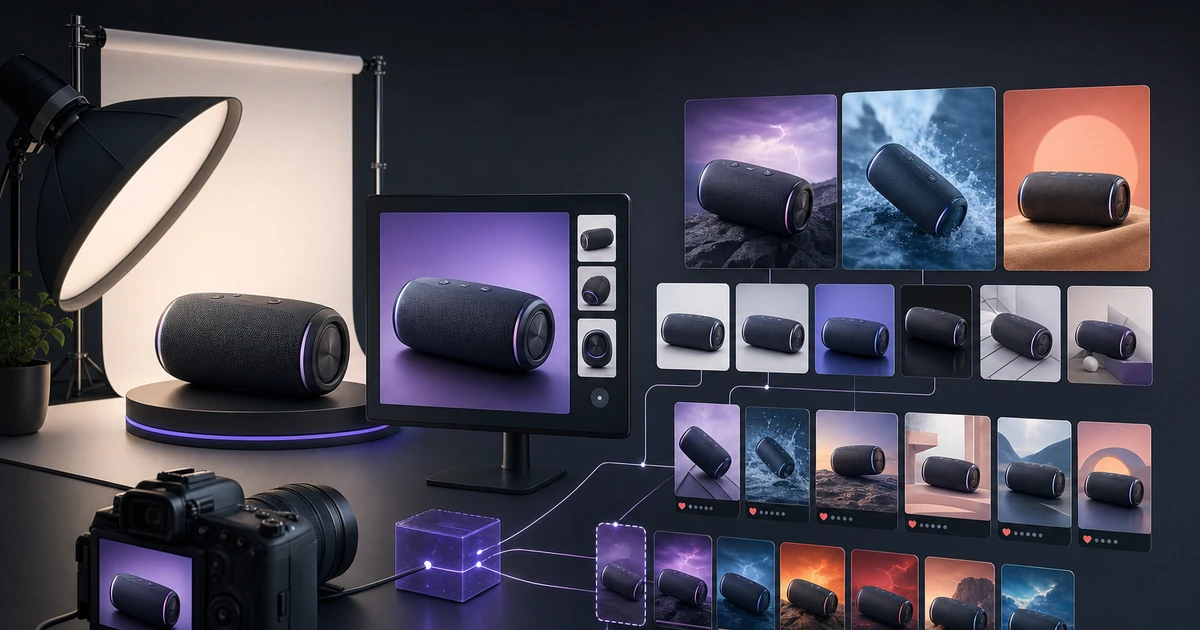
AI product photography uses generative image models to create photorealistic product visuals from a reference image or product description. The key distinction from older CGI is that modern AI understands lighting physics, material properties, and spatial context — not just pattern matching.
The core workflow is:
- Input: One real product photo (or several angles)
- Extraction: AI identifies product geometry, color, and material
- Generation: New images created in specified environments (white background, lifestyle, seasonal, platform-specific)
- Output: Multiple production-ready variants at correct resolutions
Unlike CGI, this process requires no 3D modeling knowledge. Unlike stock photo manipulation, outputs are product-accurate and brand-consistent.
How Clyero's Pipeline Works
Clyero's canvas-based pipeline separates the process into discrete, parallelizable steps:
Step 1: Product extraction node
Upload a reference photo. Clyero's extraction layer identifies the product, removes backgrounds, and maps its visual properties — color palette, texture, reflectivity, and edges.
Step 2: Scenario generation
Define your output scenarios: studio white background, outdoor lifestyle, seasonal themes, color variants. Each scenario becomes a node in the canvas. All run simultaneously.
Step 3: Copy and caption generation
An integrated LLM node generates SEO-optimized product titles, bullet point features, and platform captions for each image. This runs in parallel with image generation.
Step 4: Publishing
Connect your Shopify store, Amazon account, or social media platforms. Clyero's scheduler publishes each asset to the right channel at the optimal time.
The total time from product upload to live across five platforms: under 30 minutes.
The Economics of AI Product Imagery
| Method | Cost per image | Turnaround | Variants |
|---|---|---|---|
| Professional photoshoot | $45–120 | 2–4 weeks | Limited |
| Freelance editing | $15–40 | 3–7 days | Manual |
| CGI/3D rendering | $80–200 | 1–3 weeks | High |
| Clyero AI pipeline | $0.08–0.25 | Minutes | Unlimited |
The cost advantage compounds at scale. For a brand with 200 active SKUs requiring quarterly refreshes, AI cuts annual visual content costs from $150,000+ to under $10,000.
What to Expect in Your First 30 Days
Brands adopting AI product photography follow a predictable adoption curve:
Week 1–2: Integration and workflow setup. Configure brand kit, connect platforms, run first pipeline on 5–10 hero products.
Week 3–4: Scale to full catalogue. Most brands can process their entire product catalogue in 3–5 pipeline runs.
Month 2+: Continuous iteration. Test different backgrounds, lifestyle contexts, and seasonal themes without additional cost. Use conversion data to double down on what performs.
The brands that see the highest ROI treat AI product imagery as a continuous production system rather than a replacement for a single photoshoot.
Getting Started with Your First AI Product Image
The fastest way to evaluate AI product photography is to run a single comparison: take your current best-performing product image and generate 10 AI variants in 20 minutes. Test both in your ad creative or product listing. The data will tell you everything you need to know.
Clyero's free tier includes enough credits for this initial test without a credit card.
Related Clyero workflows
Continue with practical workflows for product visuals, video, ad creative, and marketplace content.
Frequently Asked Questions
Can AI-generated product images be used on Amazon and Shopify?
How does AI product photography compare to traditional photography in quality?
What inputs does Clyero need to generate product images?
How many images can I generate per product?
Does AI product photography work for physical products like clothing?
Try it free
Build your first AI content pipeline
Turn one product photo into a full content system — images, videos, captions, and posts — in minutes.
Start for freeClyero Team
Product & Growth
Writing about AI content creation, e-commerce automation, and the future of brand storytelling at Clyero.
Related Articles
Shopify, Etsy, and Amazon: Creative Requirements Compared
Shopify, Etsy, and Amazon have fundamentally different visual cultures, creative specifications, and buyer behavior patterns. Content that converts on one platform often underperforms on another. Understanding the specific requirements of each marketplace is the foundation of an efficient AI creative strategy.
March 28, 2026
Shopify, Etsy, and Amazon: Creative Requirements Compared
Shopify, Etsy, and Amazon have fundamentally different visual cultures, creative specifications, and buyer behavior patterns. Content that converts on one platform often underperforms on another. Understanding the specific requirements of each marketplace is the foundation of an efficient AI creative strategy.
March 28, 2026
Product Photography Without a Photographer: The Solo Seller's AI Workflow
Solo ecommerce sellers and small-team brands cannot justify a professional photography budget for every product. AI generation provides a practical alternative: produce listing-ready product images from your own smartphone photos, without photography skills, studio equipment, or design software.
March 25, 2026