
Le guide de mise en œuvre de la photographie de produits IA pour les marques de commerce électronique
Les outils de photographie de produits IA peuvent générer des images de commerce électronique de qualité studio à partir d'une seule photo de référence, mais les résultats varient considérablement en fonction du flux de travail, de la sélection du modèle et de la qualité d'entrée. Ce guide couvre ce qui fonctionne, ce qui ne fonctionne pas et comment créer un processus reproductible.
Clyero Team
Produit et croissance
October 12, 2025
Updated April 4, 2026
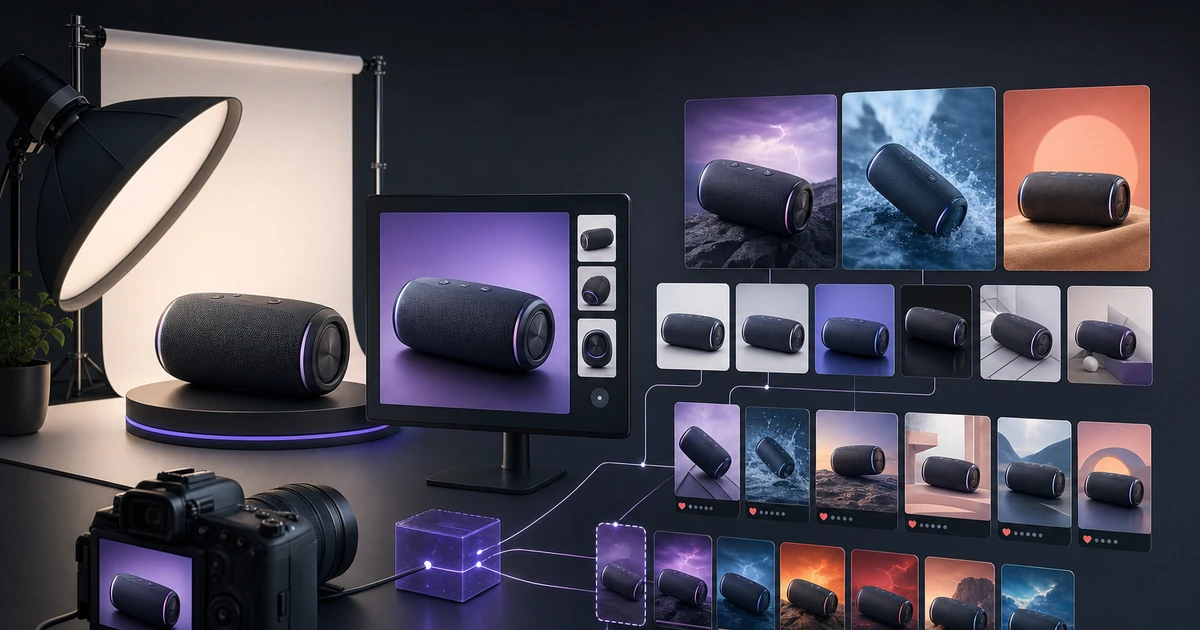
La photographie de produits IA utilise des modèles d’images génératifs pour créer des visuels de produits photoréalistes à partir d’une image de référence ou d’une description écrite. Contrairement à la retouche photo ou au rendu CGI, la génération d'IA moderne comprend la physique de l'éclairage, les propriétés des matériaux et les relations spatiales, ce qui signifie qu'elle peut placer votre produit de manière réaliste dans n'importe quel environnement sans séance photo.
Ce qui différencie les bonnes photos de produits IA des mauvaises
La qualité de la photographie de produits IA dépend de trois variables : la qualité d'entrée, la sélection du modèle et le post-traitement. Les marques qui obtiennent de mauvais résultats échouent généralement dans l’un de ces domaines.
La qualité d'entrée est la variable la plus contrôlable. Une photo de référence floue, mal éclairée ou encombrée produit des résultats incohérents. Votre image de référence doit avoir une séparation d'arrière-plan nette, un éclairage uniforme et une résolution suffisante (minimum 800 px sur le côté court). Plus l'entrée est propre, plus l'IA restitue avec précision la couleur, la texture et la forme réelles de votre produit.
La sélection du modèle est importante, car les différents modèles fonctionnent différemment selon les catégories de produits. DALL-E 3 gère bien les étiquettes de produits et le texte. Stable Diffusion XL donne plus de contrôle sur l’éclairage et l’environnement. Les modèles basés sur les flux ont tendance à produire des bords plus nets sur les biens durs. Il n’existe pas de modèle unique : le bon choix dépend de votre catégorie de produit et de vos exigences de production.
Le post-traitement comble l'écart entre « assez bon » et « prêt pour la production ». La plupart des sorties IA bénéficient d’un nettoyage de l’arrière-plan, d’une correction des couleurs et d’une mise à l’échelle de la résolution avant d’atteindre une liste de produits.
Le workflow de mise en œuvre en cinq étapes
Étape 1 : Préparez vos ressources de référence
Photographiez votre produit sur un arrière-plan propre et uniformément éclairé. Supprimez les éléments gênants. Si possible, capturez 3 à 5 angles : avant, 45 degrés, côté, détail et de haut en bas. Ceux-ci deviennent vos intrants de génération.
Étape 2 : Définissez vos scénarios de sortie
Décidez de ce dont vous avez besoin avant de générer. Les scénarios de sortie standard du commerce électronique sont les suivants : image principale sur fond blanc, contexte de style de vie (comptoir de cuisine, bureau, extérieur), variante saisonnière et cultures spécifiques à la plateforme (1 : 1 pour Amazon, 4 : 5 pour Instagram, 1,91 : 1 pour LinkedIn).
Étape 3 : Exécuter la génération en parallèle
Des outils tels que le pipeline Canvas de Clyero vous permettent de définir tous les scénarios en tant que nœuds et de les exécuter simultanément. Une seule exécution de pipeline produit toutes les variantes en un seul passage plutôt que de générer chaque image séparément.
Étape 4 : Examen de la qualité par rapport au produit physique
Examinez chaque sortie de l'IA par rapport à votre produit réel. Vérifiez la précision des couleurs, le rendu du texte sur les étiquettes et la géométrie. Les modèles d’IA peuvent halluciner les détails des produits, en particulier sur les résultats de première génération. Signalez et régénérez tout ce qui dénature le produit.
Étape 5 : Mise à niveau et formatage
Améliorez toutes les sorties approuvées à au moins 2 048 × 2 048 pixels. Exportez au format requis par chaque plateforme : JPEG pour Amazon (fond blanc principal), PNG avec transparence pour Shopify (si superposition sur des thèmes), WebP pour une utilisation web à chargement rapide.
Benchmarks de volume de sortie
Un seul pipeline exécuté sur un produit de commerce électronique standard devrait produire :
| Type de sortie | Nombre par exécution |
|---|---|
| Image principale sur fond blanc | 1 à 2 variantes |
| Images de contexte de style de vie | 3 à 5 variantes |
| Cultures spécifiques à la plateforme | 6 à 10 formats |
| Gros plans de détail/texture | 2 à 3 variantes |
| Total des actifs prêts pour la production | 12 à 20 images |
La photographie manuelle pour la même portée de sortie prend généralement 2 à 3 jours et coûte entre 400 et 1 500 $ par produit.
Erreurs de mise en œuvre courantes
Une dépendance excessive aux invites plutôt qu'aux images de référence. La génération de texte uniquement produit des résultats génériques. Utilisez toujours une photo de référence de votre produit réel comme point d’ancrage.
Sauter la validation des couleurs. Les images générées par l'IA peuvent modifier les couleurs des produits de 10 à 20 % en termes de teinte et de saturation. Cela est particulièrement important pour les vêtements, la peinture et tout ce dont la couleur est une décision d’achat.
Publication à la résolution de génération. La plupart des modèles sont définis par défaut sur 1024×1024. Ceci est inférieur au seuil de résolution pour les fonctionnalités de zoom du marché et peut réduire la qualité perçue sur les écrans haute résolution.
Traitement de tous les modèles de la même manière. Un modèle optimisé pour le photoréalisme peut ne pas restituer avec précision le logo de votre produit. Testez 2 à 3 modèles sur votre catégorie de produits avant de vous engager dans un workflow.
Pour commencer
Le chemin de mise en œuvre le plus rapide consiste à commencer avec un SKU hautement prioritaire, à générer 10 à 15 variantes en une seule exécution de pipeline et à comparer les performances avec vos images de produits actuelles. Testez A/B sur votre fiche la plus fréquentée pendant deux semaines avant de passer à votre catalogue complet.
Le niveau gratuit de Clyero fournit suffisamment de crédits pour exécuter ce test initial et voir exactement ce que la photographie de produits IA peut offrir pour votre type de produit spécifique.
Related Clyero workflows
Continue with practical workflows for product visuals, video, ad creative, and marketplace content.
Frequently Asked Questions
À quelle résolution les photos de produits IA doivent-elles être générées ?
Les photos de produits IA peuvent-elles réussir l’examen de la qualité d’image d’Amazon ?
De combien de photos de référence ai-je besoin pour générer des images de produits IA ?
Quels types de produits fonctionnent le mieux avec la photographie IA ?
Try it free
Build your first AI content pipeline
Turn one product photo into a full content system — images, videos, captions, and posts — in minutes.
Start for freeClyero Team
Produit et croissance
Writing about AI content creation, e-commerce automation, and the future of brand storytelling at Clyero.
Related Articles
Shopify, Etsy et Amazon : comparaison des exigences en matière de création
Shopify, Etsy et Amazon ont des cultures visuelles, des spécifications créatives et des modèles de comportement d'acheteur fondamentalement différents. Le contenu qui convertit sur une plateforme est souvent sous-performant sur une autre. Comprendre les exigences spécifiques de chaque marché est la base d’une stratégie créative d’IA efficace.
March 28, 2026
Shopify, Etsy et Amazon : comparaison des exigences en matière de création
Shopify, Etsy et Amazon ont des cultures visuelles, des spécifications créatives et des modèles de comportement d'acheteur fondamentalement différents. Le contenu qui convertit sur une plateforme est souvent sous-performant sur une autre. Comprendre les exigences spécifiques de chaque marché est la base d’une stratégie créative d’IA efficace.
March 28, 2026
Photographie de produits sans photographe : le flux de travail IA du vendeur solo
Les vendeurs de commerce électronique individuels et les marques en petite équipe ne peuvent pas justifier un budget de photographie professionnelle pour chaque produit. La génération IA offre une alternative pratique : produisez des images de produits prêtes à être répertoriées à partir de vos propres photos de smartphone, sans compétences en photographie, sans équipement de studio ou sans logiciel de conception.
March 25, 2026